A single server can host as many websites and web apps as it has RAM and disk for. The rule for whether a new deploy lives alongside an existing one or replaces it is the same in every flow: it depends on the identifier you give it.
The rule
The identifier is what locks one deploy to one slot on the server:
- Static site → identifier is the domain you typed during deploy.
- Web app → identifier is the app name in the Advanced section (defaults to your folder name, e.g.
my-api). - Database → identifier is the DB name + the engine (each engine — Postgres / MySQL / MariaDB — runs in its own container).
| What you do | What happens | |
|---|---|---|
| Deploy a static site with a new domain | New /var/www/<new-domain>/ folder, new [[caddyfile | Caddyfile]] block, lives alongside everything else. |
| Deploy a static site with an existing domain | The existing /var/www/<domain>/ directory is wiped and replaced with your new files. Faro asks for approval first. | |
| Deploy a web app with a new app name | New /opt/<new-app>/ folder, new unit <new-app>.service, new Caddy reverse-proxy block for its domain. | |
| Deploy a web app with an existing app name | The existing /opt/<app>/ is wiped and replaced. The service is restarted with the new code. |
Static sites — keyed by domain
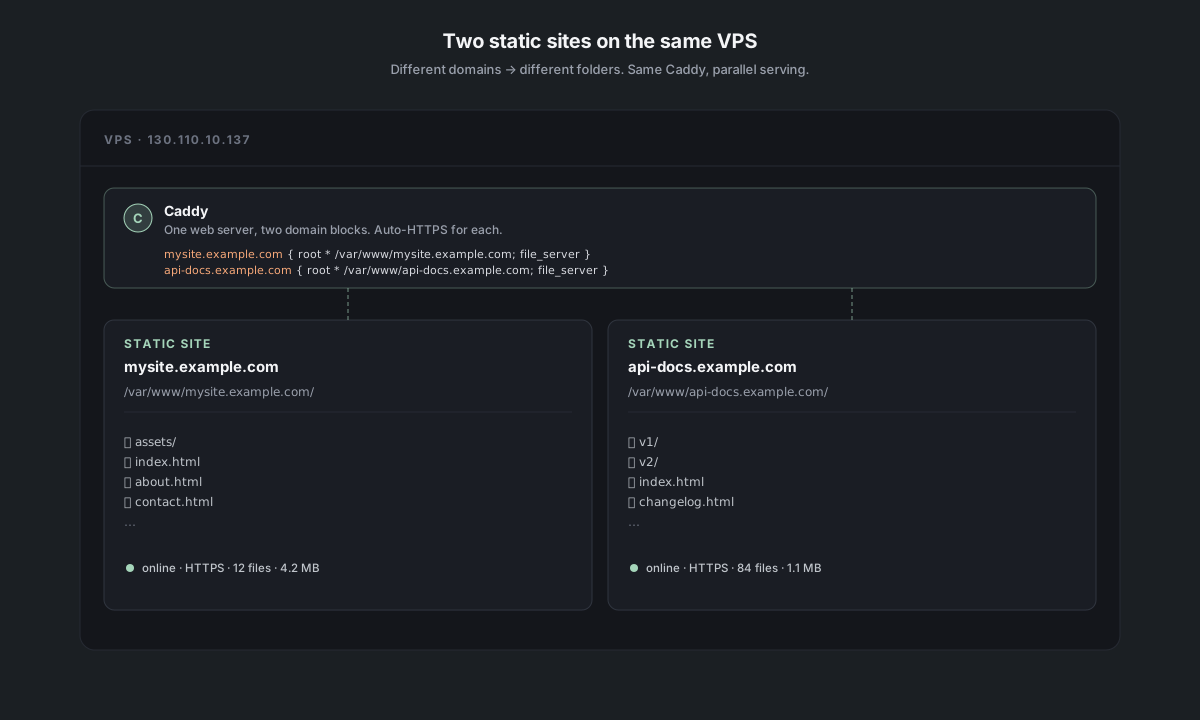
Each static-site deploy lives at /var/www/<domain>/ and gets its own block:
mysite.example.com { root * /var/www/mysite.example.com; file_server }
api-docs.example.com { root * /var/www/api-docs.example.com; file_server }
Two different domains = two different folders, two Caddyfile blocks, both serving in parallel. handles the HTTPS certificates for each independently.
If you redeploy to the same domain, Faro narrates the about-to-replace step in chat:
*"Heads up:/var/www/mysite.example.com/already contains a previous deploy. Current contents:index.html, about.html, assets/. Everything in there gets replaced with your N uploaded files. If you have a runtime dir (uploads/, data/, etc.) you want to keep, cancel now, add an empty.helm-keepfile inside it via the Files tab, and re-run the deploy."*
The .helm-keep marker is the escape hatch — see [Preserve a folder across redeploys](#preserve-a-folder-across-redeploys) below.
Web apps — keyed by app name
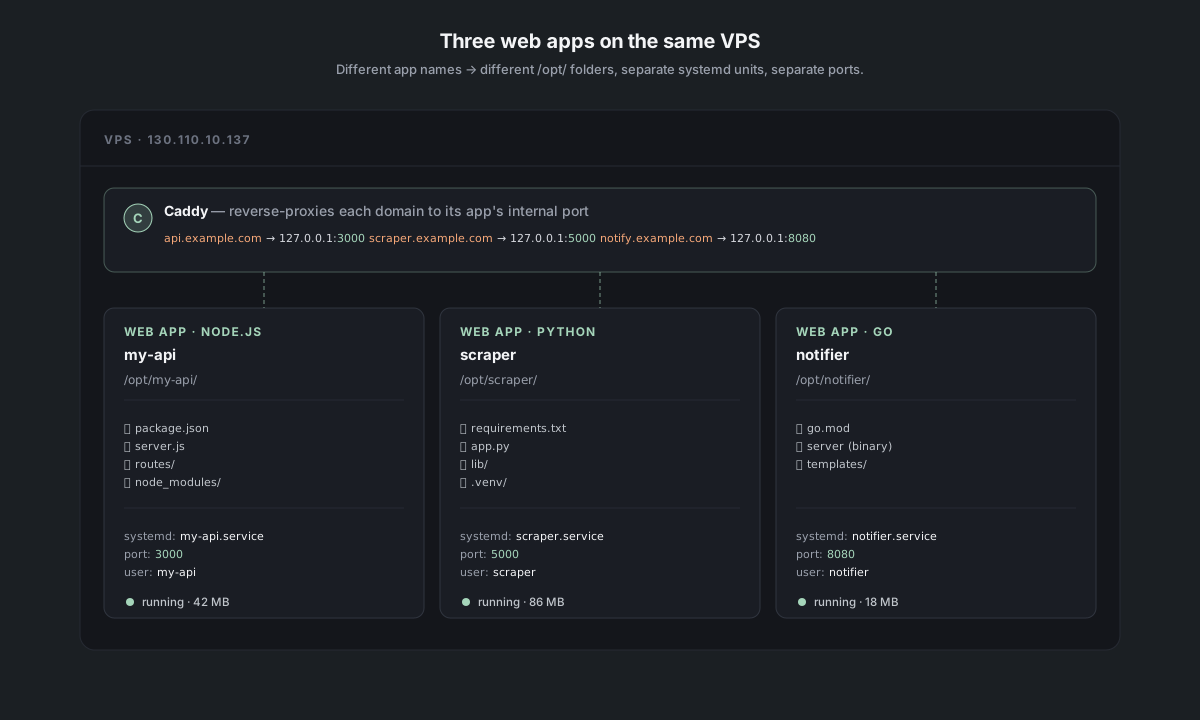
Each web-app deploy lives at /opt/<appName>/ and runs as its own unit:
/opt/my-api/      → my-api.service      (Node, port 3000)
/opt/scraper/     → scraper.service     (Python, port 5000)
/opt/notifier/    → notifier.service    (Go, port 8080)
Three different app names = three independent services. Each one has its own internal port, its own user, its own logs. reverse-proxies a domain to each. Resource cost: small (Node and Python are ~50–200 MB RSS depending on app).
If you redeploy with the same app name, the existing /opt/<app>/ is replaced and the service restarts with the new code. Same .helm-keep escape applies.
The "no-domain" slot is single
If you deploy a static site or web app without a domain, it goes to a special "default" slot:
- Static:
/var/www/default/ - Web app: same
/opt/<appName>/rules apply (you still pick an app name)
For static sites, there is only one default slot. A second no-domain static deploy replaces the first because the slot identifier is the literal string default. If you want two IP-only static sites, you need to give at least one a real (sub)domain.
For web apps, the app-name identifier still differentiates — IP-only web apps coexist fine as long as they have different app names, because the underlying port is internal and Caddy is what maps :80 to one of them. (In practice, only one no-domain web app can be the "default" Caddy target on port 80 at a time. Faro figures this out and tells you.)
Preserve a folder across redeploys
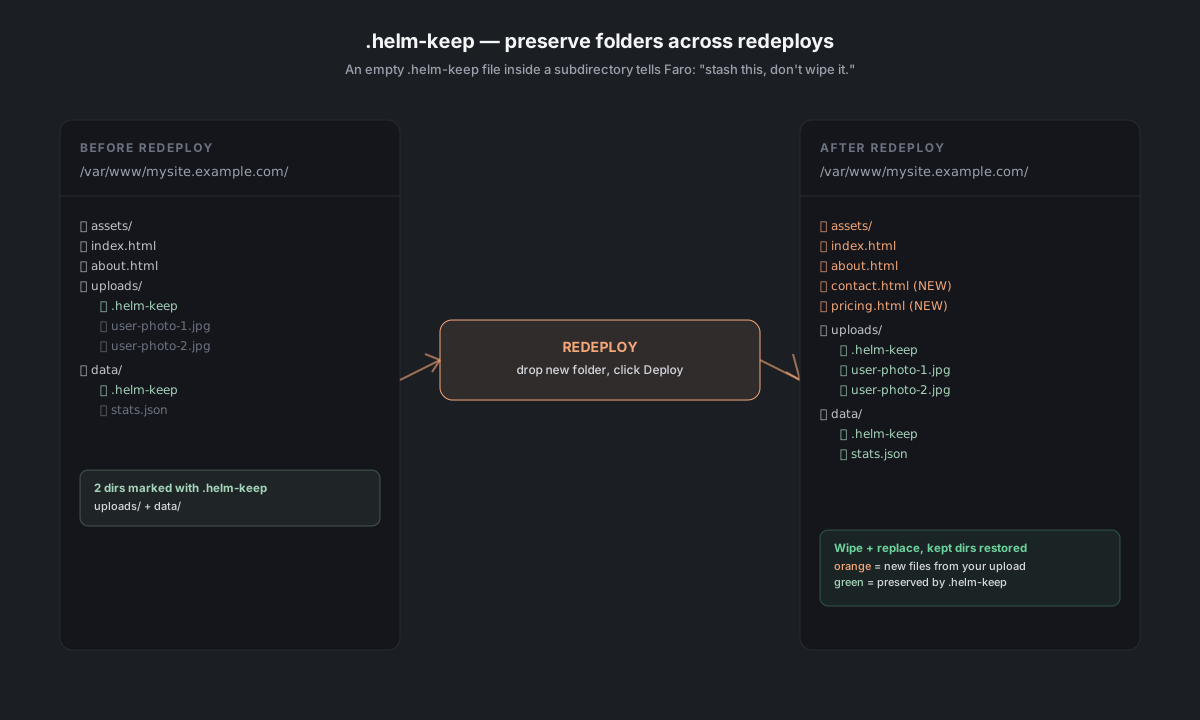
When you redeploy to the same identifier, the default is wipe-and-replace. To keep a specific subdirectory (typical case: user-uploaded data in uploads/, runtime caches in data/), drop an empty file named **.helm-keep** inside it before the next redeploy:
- Open the site's service panel → Files tab.
- Navigate into the subdirectory you want to keep (e.g.,
uploads/). - Click + New file in the toolbar, type
.helm-keep, press Enter. - Redeploy as usual — Faro detects the marker and stashes that subdirectory before wiping, then restores it after the new files land.
If you'd rather do it outside the panel, any of these also work: drag-and-drop an empty .helm-keep from your computer into the subfolder, upload it via SFTP (FileZilla, Cyberduck), SSH in and run sudo touch /var/www/<domain>/<subdir>/.helm-keep, or just ask Faro in chat (*"create an empty .helm-keep in /var/www/mysite.example.com/uploads/"*).
Faro narrates this in chat before the destructive step, listing the kept-dirs so you can confirm:
*"Preserving these because they have a.helm-keepmarker inside:uploads/, data/. Everything else gets replaced with your N uploaded files."*
If the new upload also contained a uploads/ directory, the preserved server-side version wins — Faro tells you afterwards that your upload's uploads/ was dropped. To force the upload's version to win instead, remove the .helm-keep marker and redeploy.
Resource limits
There's no hard cap on how many sites you can run — it's bounded by RAM and disk. Rough rules of thumb on a small server (2 GB RAM):
- Static sites are nearly free — files on disk + a Caddy block. You can easily run 50+ of them. The constraint is disk, and each one is usually tiny (≤ 100 MB).
- Native web apps cost ~50–200 MB RSS each, depending on language and what they do. A 2 GB box comfortably runs 5–8 of them alongside Caddy + a database.
- Container web apps add ~30–100 MB per container on top of the runtime cost — pin runtime versions but cost more RAM. See [Native vs Container](#) for the trade-off.
- Databases are the heaviest — Postgres or MySQL idle takes ~100–300 MB; under load, the buffer pool can grow to a configurable cap.
The Status tab on each service panel shows current memory + CPU; the Server panel will (in a future release) show the total roll-up across everything on the box.