Only relevant if you're deploying a web app (Node, Python, Go). Static sites and WordPress don't show this choice.
When you deploy a web app, the Advanced section in the deploy window has a toggle: Deploy as Native process or Container. Both put your app online behind with HTTPS — the difference is how your code runs underneath.
What you're choosing
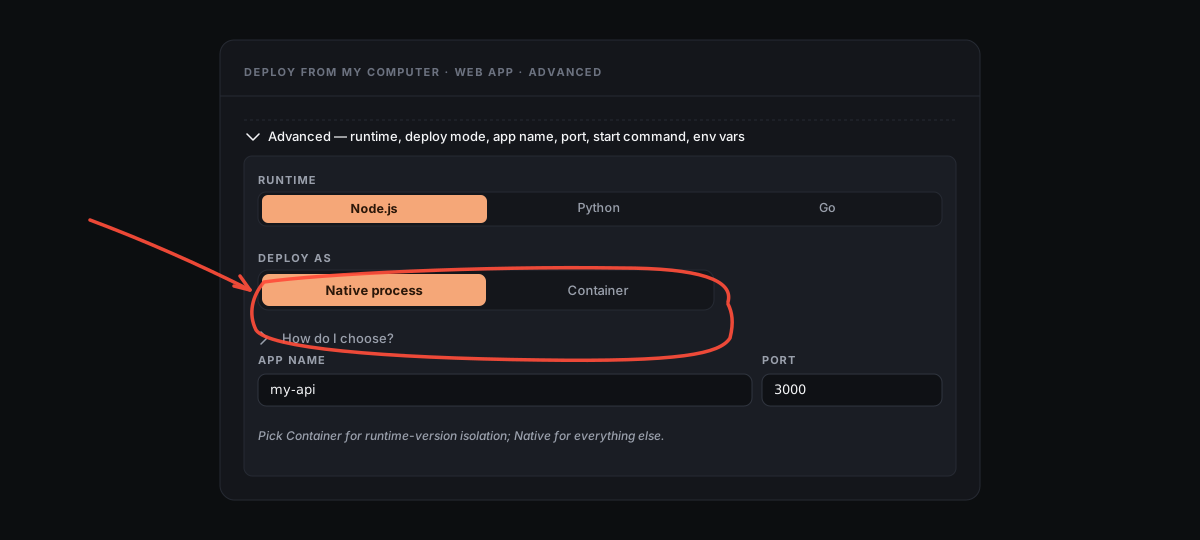
- Native process — Server Manager installs the runtime once on the host (Node 22 LTS, Python 3 + venv, or Go), then runs your app directly under as its own service.
- Container — Server Manager builds a Docker image for your app with the runtime version you pick, then runs it as a container fronted by host Caddy.
Either way: same domain, same HTTPS, same Pull-latest-from-git button, same Files-tab access to your code.
How Native works
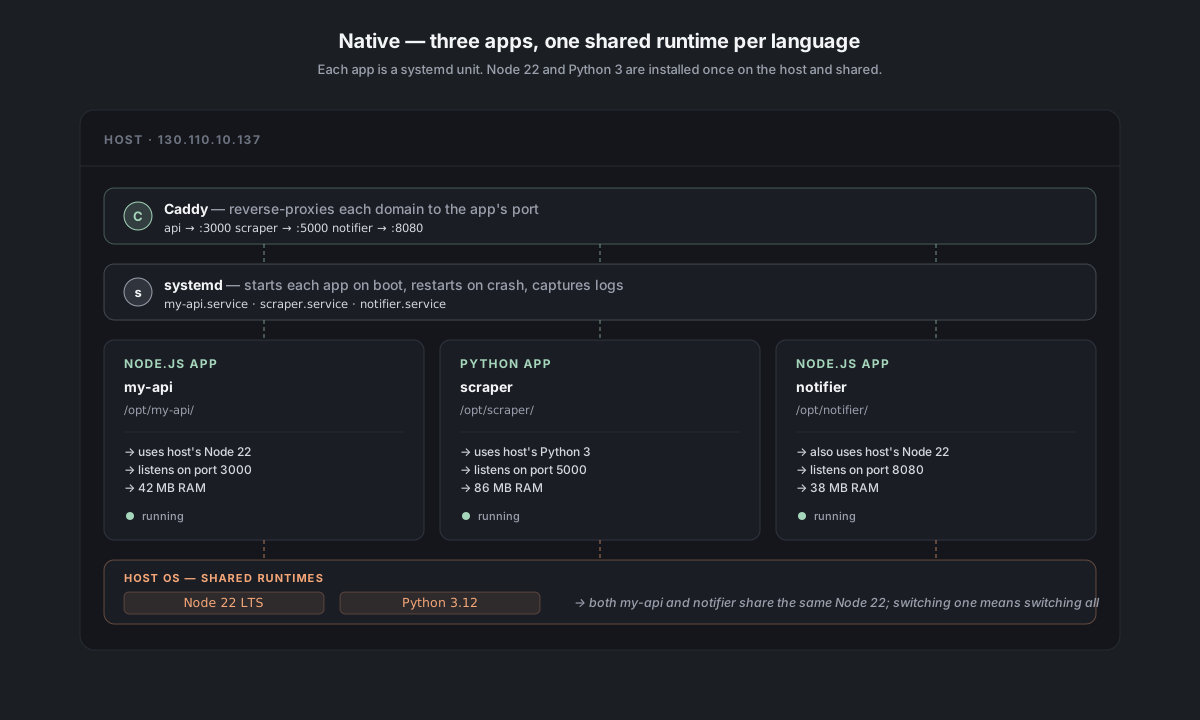
Your app lives at /opt/<appName>/ and runs as a unit called <appName>.service. The runtime (Node, Python, Go) is installed once at the OS level and shared across every native web app on the server.
- Files at
/opt/<appName>/ - Service managed by systemd —
sudo systemctl status <appName>works as expected - Logs captured by journald, surfaced in the Logs tab
- Runtime one Node 22, one Python 3, one Go install on the host — all native apps share them
How Container works
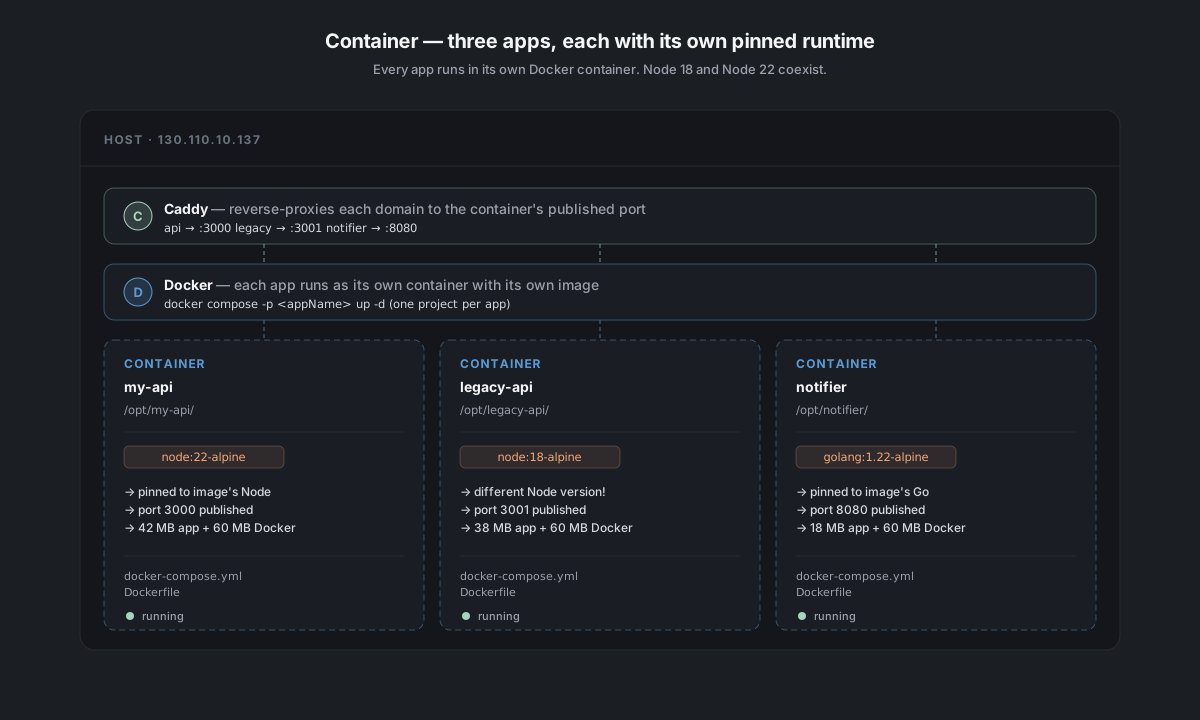
Your app runs inside its own Docker container. The compose file lives at /opt/<appName>/docker-compose.yml, and the container is fronted by host Caddy that reverse-proxies your domain to the container's internal port.
- Files at
/opt/<appName>/— your source code, plus aDockerfileanddocker-compose.ymlwe generate - Service managed by Docker —
sudo docker compose -f /opt/<appName>/docker-compose.yml psshows status - Logs captured by Docker, surfaced in the Logs tab
- Runtime each app pins its own version —
Node 18,Node 22,Python 3.11,Python 3.13can all coexist
Which should I pick?
Most apps should start with Native. Pick Container only if you have a specific reason.
| If… | Pick |
|---|---|
| You have one app on the server and don't care about version pinning | Native |
| You want the lowest RAM overhead (matters on 1 GB / 2 GB servers) | Native |
| You want fastest deploys (no image build) | Native |
| You have two apps with different runtime versions (e.g., Node 18 + Node 22) | Container for at least the odd-one-out |
| You want strict isolation between apps (e.g., one is third-party code you don't fully trust) | Container |
| Your app brings a complex non-runtime dependency (specific Postgres client version, ImageMagick build, etc.) | Container (everything ships in the image) |
| You plan to move this app to another host later | Container (the image is portable; native deploys depend on the host's runtime) |
The trade-off in numbers (rough):
- Native: ~50–200 MB RSS per app (just the app + interpreter). First deploy: 10–30 s.
- Container: ~50–200 MB RSS for the app + ~30–100 MB Docker overhead per container. First deploy: 1–3 min (image build).
On a 2 GB server that's mostly idle, you can run 5–8 native web apps + Caddy + a small database. Containers cut that to ~4–6.
Switching later
The mode is intrinsic to the app: there's no toggle in the service panel to switch a Native app to a Container or vice versa.
To switch, redeploy the app from the modal and pick the other option:
- Open Actions → Deploy from my computer (or Deploy a web app from a git repo)
- Drop your code or paste the repo URL
- Expand Advanced → flip the Deploy as toggle
- Click Deploy — the existing app gets replaced with the new mode
Code stays on disk (the .helm-keep rules from Multiple sites on the same server apply equally to Container redeploys). Your domain stays pointed at the same place. The downtime is whatever a normal redeploy takes — usually under a minute.