Server Manager is opinionated about — every recipe and wizard writes blocks, not nginx server { } or Apache <VirtualHost> or Traefik Docker labels. If your server is currently running one of those, recipes that need to touch proxy config fall back to a 💬 via chat path — they still work, but you click one extra approval per action. The Migrate to Caddy recipe takes you from that state to a fully-managed Caddy server in ~10 minutes, with a rehearsal step that lets Faro verify every site translates correctly before any real swap.
The recipe handles three source engines: nginx, Apache (both apache2 on Debian/Ubuntu and httpd on RHEL/Fedora), and Traefik (Docker-labels provider). The shape of the migration is the same for all three — only the source-side details differ.
1. Open Server Info → Web server
In the top bar, click your server name to open the , then click the **** tab.
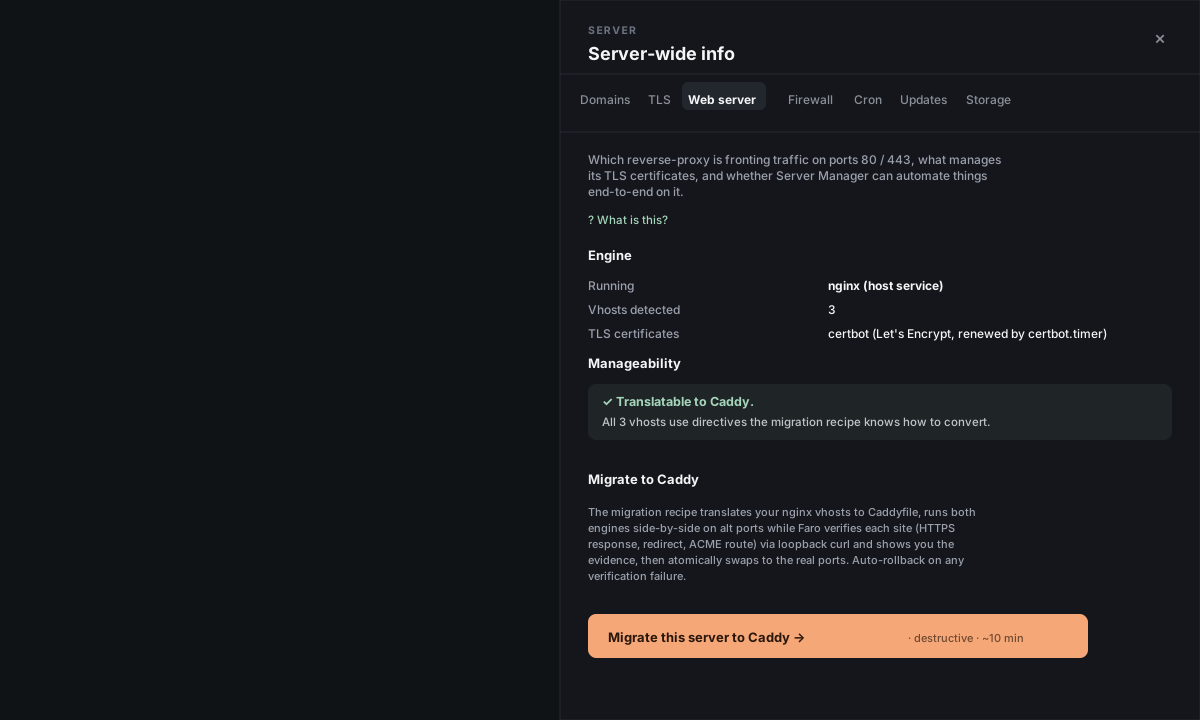
The tab shows:
- Engine — what's running on ports 80 / 443 right now (nginx / Apache / Traefik / Caddy / none).
- Vhosts detected — how many sites the engine is serving (Traefik shows "routers" instead).
- TLS certificates — who manages your HTTPS certs (typically
certbotfor nginx/Apache, Traefik's built-in ACME for Traefik). - Manageability — a translatability check: a green ✓ means every site uses directives the recipe knows how to convert; a red ✗ tells you which directive is in the way (
mod_lua,proxy_cache_path, complexRewriteRulechains, Traefik middlewares, etc.). If you hit a red ✗, the recipe refuses to run until you remove the unsupported directive — that's intentional, the recipe never silently loses behavior.
2. Click Migrate to Caddy
Click the Migrate this server to Caddy → button. Server Manager opens the chat panel and Faro takes over from there.
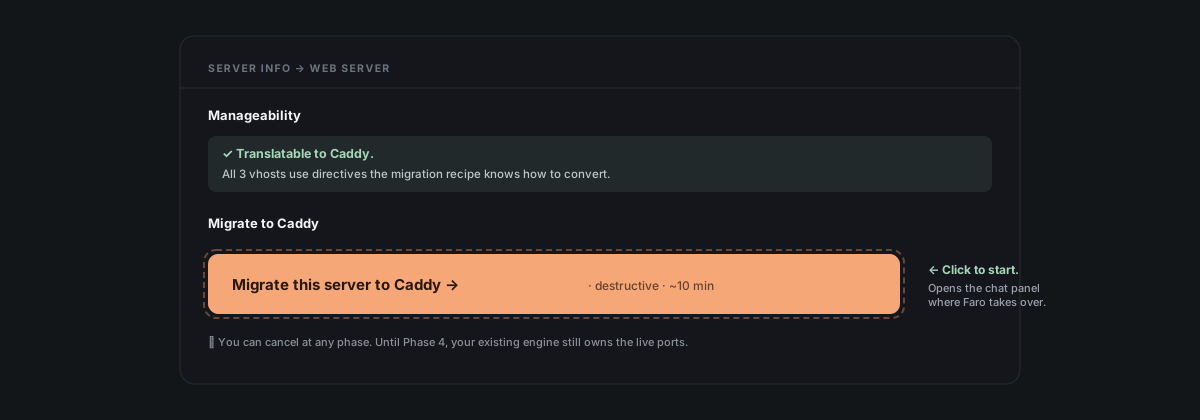
The recipe runs in 5 phases. Phase 0 is read-only (just a verification pass). Phases 1–4 each pause for your approval before running any destructive command. You can cancel at any point — until Phase 4's atomic swap, your existing engine still owns the live ports and your sites keep serving traffic unchanged.
3. Approve each phase
Faro narrates what's about to happen before each approval. The bundles are short and focused.
- Phase 0 — Pre-flight. Read-only: enumerates your existing vhosts, checks for unsupported directives, finds the Let's Encrypt admin email. Ends with a plain-English plan + a
Reply: gobutton. Click it (or typego) to start. - Phase 1 — Install Caddy. Adds the official Caddy repo, installs the package, immediately stops the service. Your existing engine still owns the ports.
- Phase 2 — Translate. Writes a candidate Caddyfile to
/tmpand validates it. Nothing live changes yet. - Phase 3 — Rehearse. Starts Caddy on alternate ports
:8080/:8443so it can be tested without touching real traffic. Faro then runs loopbackcurltests itself (HTTPS, HTTP→HTTPS redirect, ACME challenge route) and shows you the response evidence per domain. Your existing engine still serves the real:80/:443.
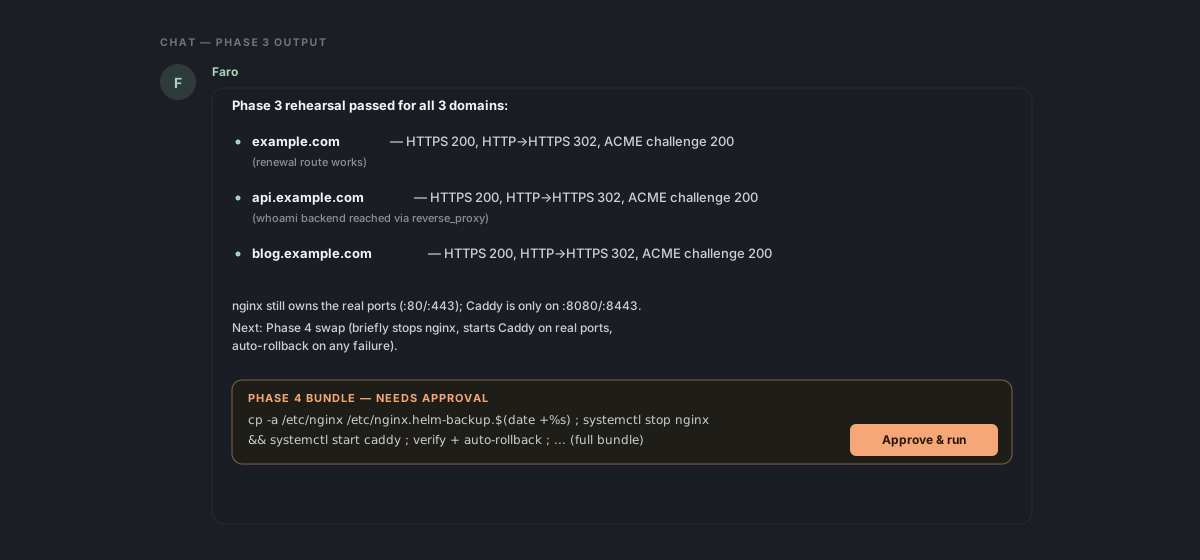
- Phase 4 — Atomic swap. Backs up your existing config (
/etc/nginx.helm-backup.<timestamp>/or/etc/apache2.helm-backup.<timestamp>/or/tmp/traefik.helm-backup.compose.*.yml), stops the old engine, starts Caddy on real ports:80/:443, verifies every domain with one more curl pass, then switches your existingcertbot.timerfrom the engine-plugin renewal mode (certbot --nginx,certbot --apache) to webroot mode that Caddy can serve. Thecertbot.timerkeeps owning renewal; a deploy-hook reloads Caddy on each renewal so you never need to touch it.
If verification fails at any point in Phase 4, the recipe auto-rolls back: stops Caddy, restarts the old engine, leaves your existing config untouched. You're back to the pre-migration state in <10 seconds.
4. Confirm + handoff
After Phase 4 succeeds, Faro asks you to open Server Info → Web server one more time to confirm.
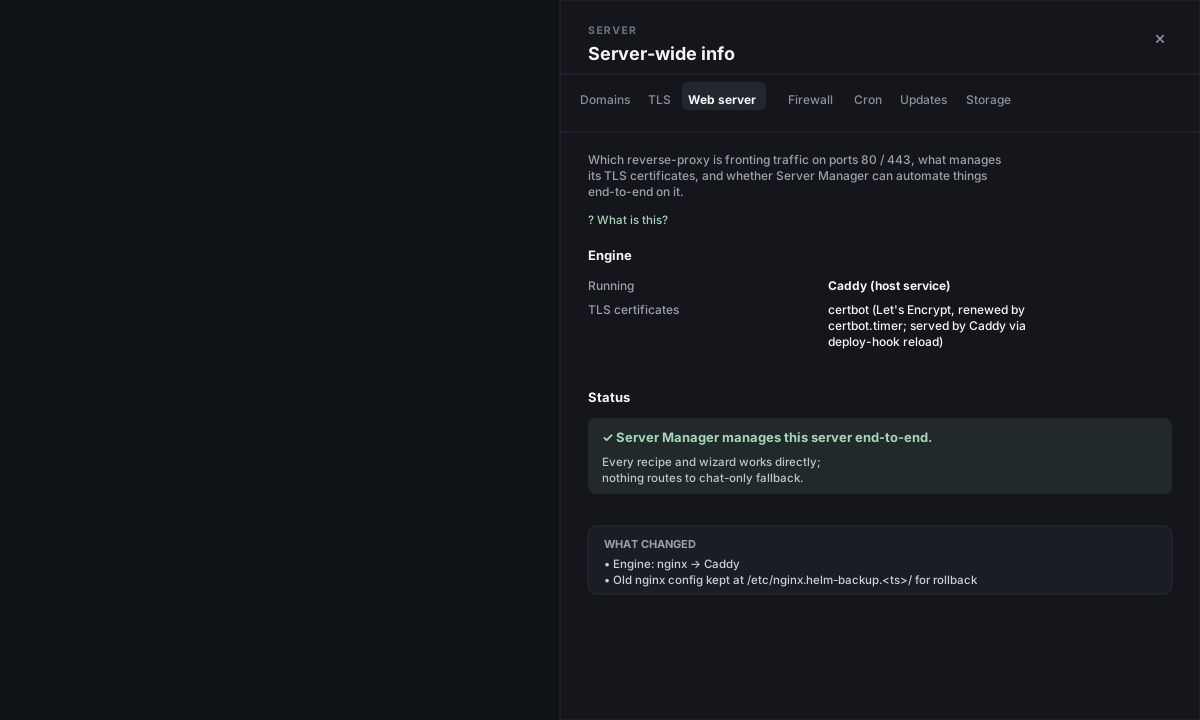
The tab refreshes itself on open (no disconnect/reconnect needed). You should see:
- Engine: Caddy (host service)
- TLS certificates — for nginx/Apache migrations:
certbot (Let's Encrypt, renewed by certbot.timer; served by Caddy via deploy-hook reload). For Traefik migrations:Caddy ACME (automatic Let's Encrypt)— Traefik's oldacme.jsoncerts aren't reused; Caddy obtains fresh ones during the cutover. - Status: ✓ Server Manager manages this server end-to-end. Every recipe and wizard works directly; nothing routes to chat-only fallback.
Your old engine package stays installed (but disabled) for ~30 days as a manual rollback option. The config backup also stays on disk. Once you're confident the migration is solid (~1 week), you can apt remove nginx / apt remove apache2 to free a few MB, or stop the old Traefik container with docker rm traefik.
Per-engine notes
The rehearse-then-swap shape is the same across engines. The differences are mechanical:
nginx. Source-engine probe via sudo nginx -T. Backup at /etc/nginx.helm-backup.<ts>/. Renewal handoff: authenticator = nginx → authenticator = webroot in /etc/letsencrypt/renewal/<domain>.conf. The certbot --nginx plugin stops being used; certbot.timer keeps running.
Apache. Same shape with paths swapped for apache2 (Debian) or httpd (RHEL). Vhost enumeration via apache2ctl -S + reading sites-enabled/ (or conf.d/ on RHEL). Backup at /etc/apache2.helm-backup.<ts>/. Renewal handoff: authenticator = apache → webroot. mod_php setups are flagged unmanageable until you remove them — Caddy doesn't run PHP in-process the way Apache + mod_php does.
Traefik. Source-engine is a Docker container, stopped with docker stop traefik (not systemctl stop). Vhosts come from traefik.http.routers.* labels on running containers, not from config files. Cert reuse is skipped — Caddy obtains fresh Let's Encrypt certs via auto-HTTPS during the cutover, costing one fresh issuance per domain (~30–60 second cert window). Routers with custom middlewares or non-Host() matchers are flagged unmanageable. Backends must have host-published ports (e.g. 127.0.0.1:8080:80 in the compose file) — Caddy as a host service can't reach Docker-network-only containers.
What if the recipe refuses?
If the manageability check is a red ✗, Faro names the exact directive and vhost. Typical fixes:
- **nginx
proxy_cache_path/fastcgi_cache** — these don't translate 1:1 to Caddy. Remove the cache zone (or move caching to a CDN like Cloudflare) and retry. Most non-Caddy users on small servers don't need on-box caching. - **Apache
RewriteRule ... [L,R=301]** — flag bundles indicate multi-step chains the translator can't model. Convert to a simplerRedirect permanent, or pre-flatten the chain. - Traefik middlewares — middlewares need per-type Caddy translation that the recipe doesn't auto-do in v1. Remove the middleware labels and apply the equivalent in Caddy after migration (basic auth, rate limit, headers — all supported, just not auto-translated).
- **Traefik
HostRegexprule** — regex matchers aren't 1:1 translatable. Switch to one or moreHost()rules with explicit hostnames.
If you can't simplify your config and don't want to migrate, the chat path still works for everything Server Manager would normally do via recipes — deploy a site, install WordPress, connect a domain, set up a database, take a backup, restore from one, etc. Faro reads your existing engine and proposes the right native commands (/etc/nginx/sites-available/ + certbot --nginx for nginx, the Apache equivalent, Docker labels for Traefik). Concrete example asks that work today on a non-Caddy server:
- "Add a new WordPress site at blog.mysite.com on this nginx server" — Faro proposes the nginx vhost + the docker compose for WordPress + certbot. You approve each bundle.
- "My TLS cert for api.mysite.com is about to expire — check it and renew if needed" — Faro runs the inspection + the renewal + the reload, all in chat.
- "Take a backup of the api.mysite.com workload" — Faro figures out what to dump + how to package it + offers the download link.
You don't lose features by staying on your current engine. You trade one-click UI affordances for chat-mediated equivalents.
Reference
Files written on your server during migration:
/etc/caddy/Caddyfile— Caddy's site config (new on this server)/var/www/certbot/.well-known/acme-challenge/— webroot for ACME renewals (nginx + Apache; not used for Traefik migrations)/etc/letsencrypt/renewal-hooks/deploy/reload-caddy.sh— reloads Caddy on each certbot renewal (nginx + Apache only)/etc/letsencrypt/renewal/<domain>.conf— surgically edited to swapauthenticator = nginx/authenticator = apache→authenticator = webroot(nginx + Apache only)
Files / state preserved for rollback:
- nginx:
/etc/nginx.helm-backup.<timestamp>/(full config copy) - Apache:
/etc/apache2.helm-backup.<timestamp>/(Debian) or/etc/httpd.helm-backup.<timestamp>/(RHEL) - Traefik:
/tmp/traefik.helm-backup.compose.<timestamp>.yml(the docker-compose file), plus the stopped Traefik container itself - Old engine package stays installed but disabled (
systemctl disable apache2/nginx;docker update --restart=no traefik)
Approval gates: typically 4 clicks for nginx and Apache, 5 for Traefik (the extra one is when Faro needs to pick a non-default rehearsal port if your backend already uses :8080).